Outcomes
Impact that's visible
From invisible waste to measurable savings. Astuto OneLens reveals optimization opportunities across your entire cloud environment and helps teams capture value they were leaving on the table

OneLens is the unified cost intelligence platform for engineering and finance teams. Giving you real-time visibility, allocation, and optimization across AWS, Azure, GCP, Kubernetes, GPU infrastructure, and LLM usage
Trusted by Engineering & FinOps teams from leading businesses




From invisible waste to measurable savings. Astuto OneLens reveals optimization opportunities across your entire cloud environment and helps teams capture value they were leaving on the table
30%
Average cloud + AI cost reduction
36 hrs
Median time to first cost insight after onboarding
$2M+
Cost savings identified across customers
12+
AI providers, cloud platforms & data tools integrated
From cloud infrastructure to AI workloads, OneLens brings together every cost driver so engineering and finance teams can understand, allocate, and reduce spend from a single platform.

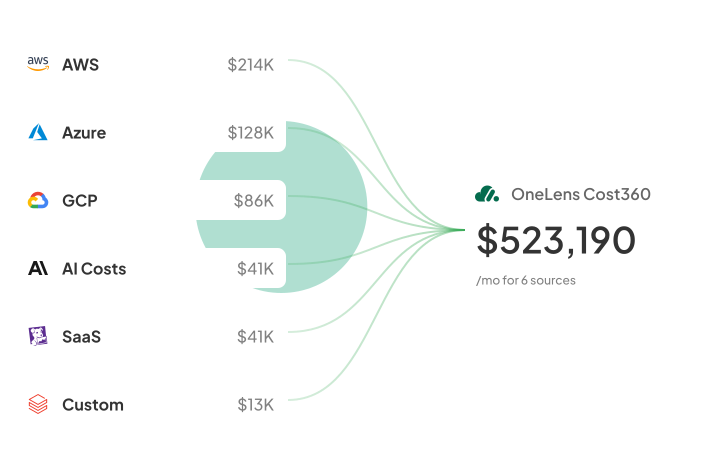
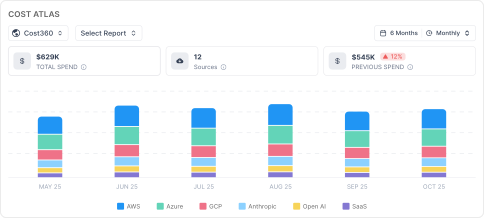
Ingest and unify costs from every cloud, SaaS tool, & custom source. Get the full picture, allocate costs with confidence, & stay ahead of surprises.

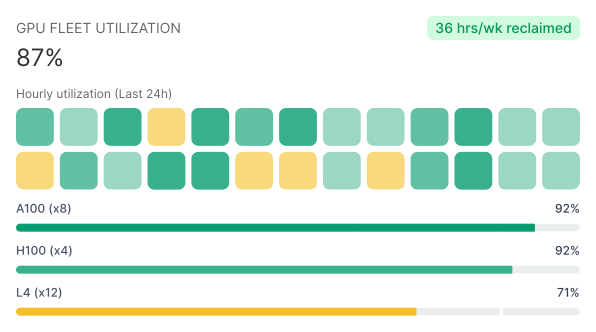
Track GPU utilization, identify idle capacity, and right-size expensive clusters to maximize every GPU powering training & inference workloads.

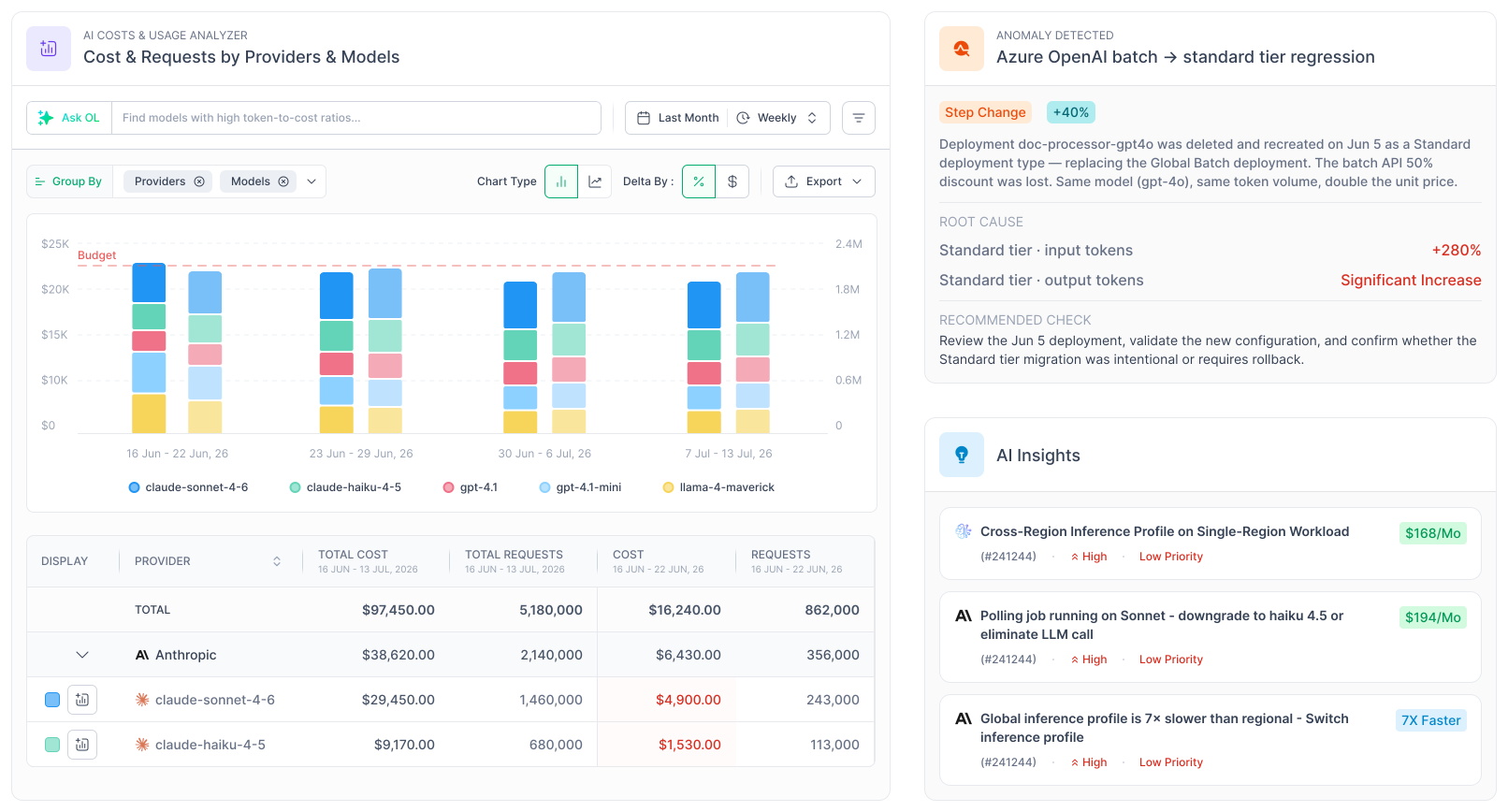
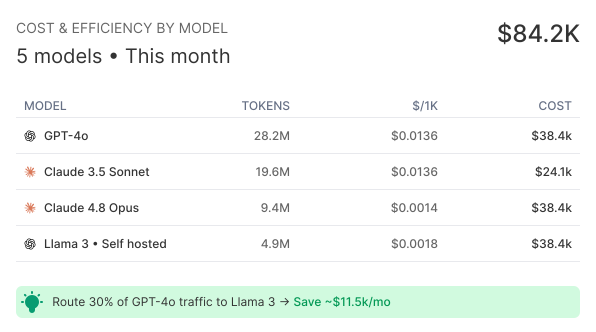
Track token consumption, model usage, provider spend, and inference costs across every LLM, so every request is measurable and every dollar is accounted for.

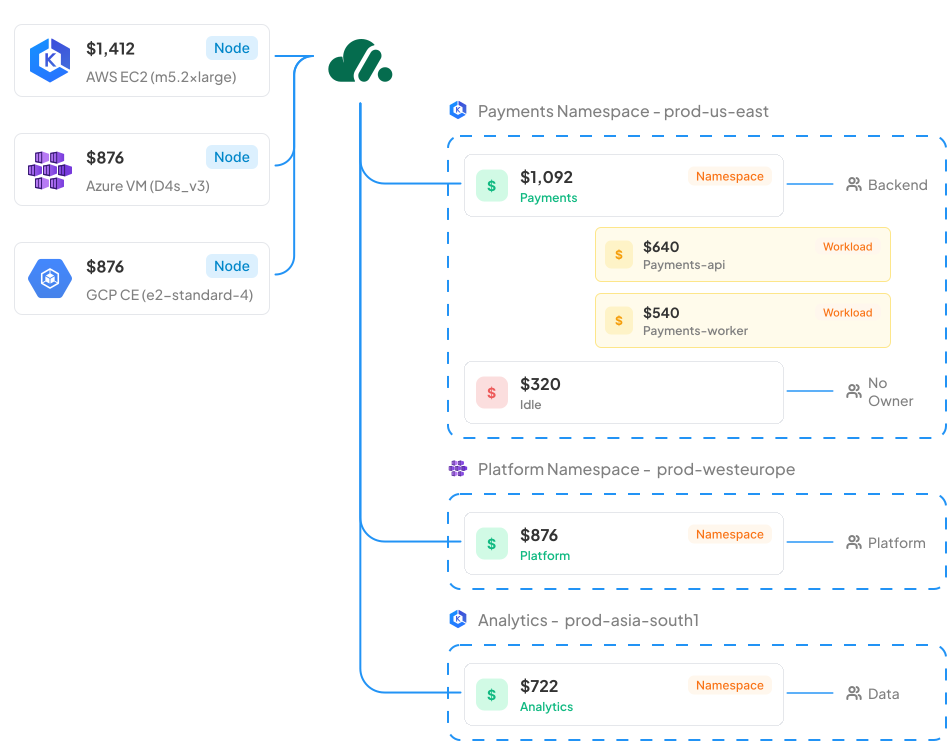
See exactly where Kubernetes costs originate. From clusters and namespaces to individual workloads. Uncover waste, improve utilization, and maintain complete control as your infrastructure scales.
From cloud infrastructure to AI workloads, OneLens brings together every cost driver so engineering and finance teams can understand, allocate, and reduce spend from a single platform.
OneLens unifies cloud infrastructure, Kubernetes, GPUs, AI providers, and custom billing into a single source of truth.
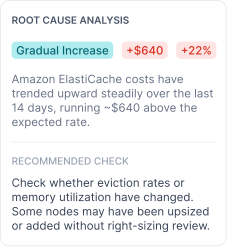
Detect sudden spikes, unusual usage patterns, and hidden cost drivers across every cloud and AI workload before they become expensive problems.

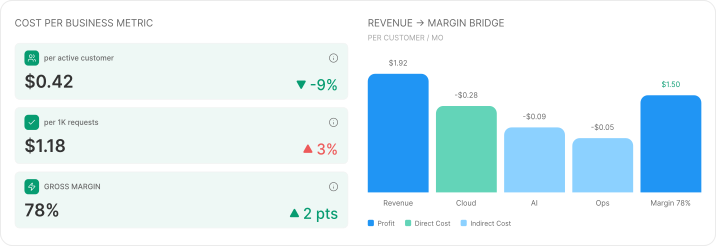
Attribute spend across shared infrastructure and uncover unit economics for every customer, product, feature, or transaction.
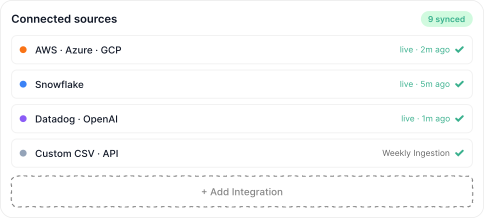
Bring in invoices, APIs, data lakes & custom billing sources with Cost360 so every financial decision is based on complete data.
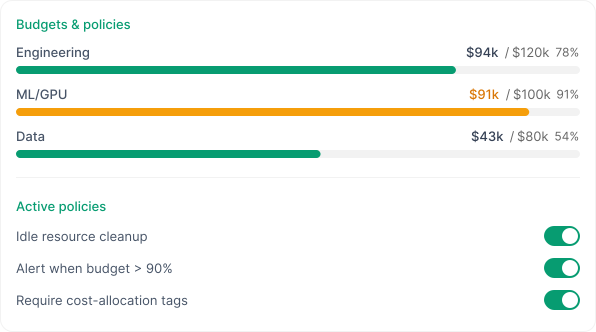
Whether you're managing cloud infrastructure, AI workloads, or Kubernetes clusters, OneLens helps you govern spend with automated policies and intelligent workflows.
Stop switching between consoles. See AWS, GCP, Azure, and Kubernetes costs in a single view.





Push insights, anomalies, tickets, and approvals directly into Jira, Slack, ServiceNow, Teams, or your existing workflows.
Hear from teams at leading modern organisations.
OneLens offers clear visibility into cloud expenses, delivering actionable insights and effective anomaly detection. The platform is user-friendly and makes it simple to spot waste and unexpected spending, all without requiring much manual work. OneLens helps solve the lack of visibility and control over cloud costs by providing real-time insights and anomaly detection. It helps us quickly identify unexpected spend, understand cost drivers, and take action early, which leads to better cost optimization and fewer budget surprises.
OneLens has been instrumental in identifying cost-saving opportunities through optimisation recommendations and actionable insights. The platform suggested changes in our infrastructure setup that led to significant savings and better resource utilisation. Its automation features and ready-to-use workbooks have streamlined monitoring and reporting, reducing manual effort while improving visibility across environments. OneLens is solving the challenge of tracking and optimising cloud costs by providing clear recommendations on infrastructure changes, right-sizing, and resource cleanup. It helps us proactively identify inefficiencies, leading to reduced spend and improved performance. Additionally, its automation and reporting capabilities save time by eliminating manual analysis, allowing the team to focus on strategic improvements.

Astuto OneLens has allowed us to embed cost optimization into our day-to-day engineering workflows. It’s no longer a separate task—it’s a mindset. With real-time prioritization and ready-to-execute recommendations, we’ve fundamentally changed how we manage cloud efficiency at scale.

Once we started using Astuto OneLens, the dashboard provided clear, actionable cost-saving insights, leading to significant savings in just two weeks! We now rely on OneLens to keep our AWS costs in check and highly recommend it to any company looking to optimize cloud expenses.

The best thing about OneLens has to be their support team - they're super quick to help when you need them. The platform does a great job monitoring cloud costs, and they keep adding new features every week. They group their suggestions by how much work they'll take...


OneLens brings costs of all your cloud costs across multi-cloud (AWS, Azure, GCP, OCI), Kubernetes (EKS, AKS, GKE), AI, and your custom sources at one place. OneLens allows you to allocate costs and set budgets across all these sources to your business constructs such as Business Units, Applications, Projects, Environments, etc. Then, you can setup custom workflows which deliver precise, timely, and relevant cost alerts and anomalies to teams and individuals who are accountable. No Cloud Native tool gives you deep, unified Kubernetes cost visibility – across requests, limits, usage, and nodes at on place: OneLens does.
Our goal is to bring all your Cloud, AI, and Kubernetes costs at one place; make it super easy for respective teams to understand and optimize costs. Our Kubernetes Cost Visibility, Workflow Engine, and Deep Insights (storage, networking, data transfer) module stands out, solving the hardest and most time consuming problems of engineering and devops teams.
Most customers see their first cost and optimization insights within 36 hours of connecting cloud accounts.
OneLens integrates directly with your clusters to break down costs by namespace, pod, deployment, service, and any custom labels you use. We calculate true cost including shared cluster resources (control plane, system pods), ingress/egress traffic, and persistent storage-then allocate everything based on actual resource consumption. For organizations with large Kubernetes spend, this transforms opaque infrastructure costs into team-level accountability.
OneLens works with all major Kubernetes distributions including Amazon EKS, Azure AKS, and Google GKE. Our integration is read-only and doesn't affect cluster performance or require changes to your workloads.
Native Cloud tools do not collect adequate data for you to understand Kubernetes costs. We deploy an agent to bring all all that data to generate required insights. You can learn all about it here. The cost is minimal and all details are here.
Yes. OneLens provides granular cost visibility at every level - cluster, namespace, deployment, pod, and even individual container. You can view costs by any Kubernetes label including team, application, environment, or customer ID. This enables precise cost allocation and charge-back for shared clusters.
OneLens gives you precise per-pod CPU/memory cost, which allows you to allocate costs by namespaces, workloads or labels as per your business requirements. Further, OneLens automatically distributes shared cluster costs (idle costs, network costs) across pods. This ensures fair cost distribution and budgeting.
No. OneLens works with your existing Kubernetes setup and doesn't require changes to your deployment patterns, namespaces, or label structure.
OneLens natively supports AWS, Microsoft Azure, Google Cloud Platform and Oracle Cloud. We ingest billing data from all three providers and normalize it into a unified view so you can manage multi-cloud costs in one platform without switching between native tools.
We have read-only access carefully designed to make sure we only have billing, resource and usage data without getting access to any of your PII/customer data.
Yes, we do. While you can analyze costs for each Cloud, you can also look at costs across cloud using FOCUS format. This allows you to create cost centers across cloud spends and setup budgets.
Yes. OneLens tracks costs for AI platform services like OpenAI, AWS Bedrock, Azure AI Foundry, Google Vertex AI across all cloud providers.We show you exactly what your AI experimentation and production workloads cost. We are adding more AI providers every week.
OneLens enables you to set budgets for AI projects, track spending against forecasts, and get alerted when costs exceed thresholds. Combined with cost allocation, this gives you visibility into which AI experiments or models are driving costs—helping you make informed decisions about resource allocation and project prioritization.
OneLens uses transparent usage-based pricing calculated as per your managed cloud spend (Excluding taxes!). We have tiers to ensure you can grow during the subscription term and not be surprised by any hidden charges. You only pay based on the cloud infrastructure we help you optimize and control.
OneLens is built for organizations managing significant cloud infrastructure - typically $50K+ monthly
Yes. We offer proof-of-concept engagements where you connect OneLens to your actual cloud data and validate the value before signing an annual agreement. Most POCs run for two weeks and include full platform access with implementation support.
We offer both annual agreements and flexible month-to-month arrangements on AWS Marketplace depending on your organization's procurement cycles and budget planning. Contact our team to discuss what works best foryour situation.
We are SOC 2 Type 2 Compliant and ISO 27001 certified. Please check out our trust center for more details.
OneLens primarily requires read-only access to your billing and usage data. Further, the read-only access is carefully designed to ensure that we don’t get access to data in your logs/buckets.
OneLens is built with enterprise security standards including encryption at rest and in transit, SOC 2 compliance, role-based access controls, and regular security audits. Your cost data is isolated in dedicated environments and never shared across customers.
OneLens stores data in secure, encrypted databases within your choice of AWS/GCP regions.
Yes. OneLens includes granular role-based access controls, allowing you to restrict visibility by any org dimension through construct of cost centers. Finance teams can see enterprise-wide data while individual teams see only their allocated costs.
We strongly believe that FinOps is not about software subscription. We assign a named, dedicated Cloud FinOps expert as your customer success and support point of contact. We work closely with finops, engineering and business teams to ensure they are on top of costs, leaks and savings.
You can connect with our team directly on Slack, Teams and Email. We have detailed documentation at https://docs.onelens.cloud
Initial cloud onboarding is quick – just takes 10-15 minutes to deploy our automated IaC scripts to give us access. Post that it will take 24-48 hours for the initial data ingestion before we can share insights on your cloud infrastructure. Kubernetes onboarding takes a bit longer since it involves deploying agents, and waiting for enough data to generate insights.








.jpeg)
